This article how to repair Sage 50 data files with the use of a database repair utility tool. In such cases, the database repair utility tool can be helpful, but if the error continues even after performing the below resolution steps.
Although, Sage 50 is top-used accounting software with enhanced features and functionality, at times, damaged or corrupted data files can put you in trouble and make you more frustrated and annoyed.
Major Causes of Sage 50 Data Files Error, or Corrupt
There are several reasons for corrupting the data file in the Sage 50 accounting system. However, for the smooth functioning of the software, Sage 50 data files must be error-free.
Improper Connection between network and data path.
How to Repair Sage 50 Data Files
Follow the below-mentioned steps to repair the Sage error data corruption easily by using the database repair utility tool.
Step 1: Start the Tool
To extract easily all the files that are associated, start the tool that helps you to verify the proper functionality of these tools.
Select the End User License Agreement text box that displays on your computer
Click on the option Agree
Choose one from all 3 options that display on the computer window screen:
Install Pervasive
Remove Pervasive
Create a New Local Data Path.
Solution II: Install Pervasive
Select the option to install Pervasive Utility and access it.
You must be logged in to the computer as the administration.
The problem will be automatically fixed by this utility.
Re-install the latest released version of Sage 50 Service now.
Solution III: Remove Pervasive
Uninstall the Pervasive from the system.
You must be logged in to the computer as the administration
Ensure that all the other sage users are not logged in to the system
Turn off the Sage 50 software
Start to eradicate Pervasive Utility.
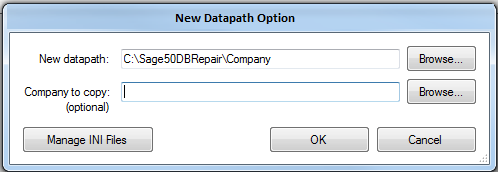
Solution IV: Generating a New Local Data Path
This utility helps in creating a Sage 50 data path easily. You can perform this process with the aid of “factory default files”.
Verify the location needed for the new data path.
With the feature, the Company to Copy option is to shift the total directory from the previous data path to the latest created path.
Go back to the innovative path, with the Manage INI Files
Move to the original data path
Choose the option Make Active
Press Close and then re-install the recent version of Sage 50.
With the resolution step mentioned above, you can easily rectify and repair Sage 50 data files. However, if the error prevails, even after performing the fixation steps or by using the Sage 50 tool database repair utility. To repair the Sage 50 data files error, you just require relaxing and connect with a Sage 50 consultant.